The Night Subnetting Almost Made Me Quit IT Forever
It was 11:30 PM on a Thursday. I had my Official Cert Guide open to the subnetting chapter, a legal pad covered in binary numbers that looked like a robot had a seizure, and a half-eaten bag of Doritos that was doing more for my morale than four hours of studying had.
My wife walked in, looked at the carnage on my desk, and said, “Are you winning?”
I was not winning.
I’d been staring at the same practice problem for twenty minutes: “Given the IP address 172.16.94.27/21, what is the network address, the broadcast address, and the number of usable hosts?”
I knew—intellectually—that I was supposed to convert things to binary. I knew there was a subnet mask involved. I knew the answer existed somewhere in the math. But every time I tried to work through it, I’d get lost somewhere between the binary conversion and the “borrow bits from the host portion” step, and I’d end up with an answer that wasn’t even one of the multiple choice options.
That night, I seriously googled “IT jobs that don’t require subnetting.”
Spoiler: there aren’t any good ones.
Fast forward six weeks, and I was subnetting in my head faster than most people can open a calculator app. Not because I’m some kind of math genius—I got a C in college algebra and I still count on my fingers sometimes. I figured it out because I finally found a method that made the whole thing click, and then I practiced it until it became muscle memory.
This is that method. Every single step, from “what even is a subnet” to “I just solved that /19 problem in eight seconds.” No shortcuts that skip understanding. No “just memorize this chart” nonsense that falls apart the second Cisco throws you a curveball. The real thing.
If subnetting makes you want to cry, you’re in exactly the right place. I cried first so you don’t have to.
Why Subnetting Matters (And Why Cisco Is Obsessed With It)
Before we dive into the how, let’s talk about the why—because understanding why subnetting exists made it ten times easier for me to learn.
Imagine you live in a city where every single house shares the same zip code. Need to send a letter? The post office has to check every single house to find the right one. That’s what a network without subnets looks like. Every device screaming into the void, every broadcast hitting every other device, and your network grinding to a halt because nobody can find anything.
Subnetting is how we divide one big, chaotic network into smaller, organized neighborhoods. Each neighborhood (subnet) has its own address range, its own broadcast domain, and its own boundaries. Devices in the same subnet can talk to each other directly. Devices in different subnets need a router—like needing to take the highway to get to the next town over.
Cisco is obsessed with subnetting on the CCNA exam because it’s the foundation of literally everything else. Routing? You need to know subnets. ACLs? Subnet-based. VLANs? Each one gets a subnet. Troubleshooting? Half the time, it’s a subnetting mistake.
You cannot escape it. So let’s conquer it.
The Absolute Basics (I Promise This Won’t Hurt)
IP Addresses: Your Network’s Home Address
An IP address is four numbers separated by dots. Something like 192.168.1.50. Each of those four numbers is called an octet because behind the scenes, it’s made up of 8 binary digits (bits). Four octets × 8 bits = 32 bits total. That’s all an IPv4 address is: a 32-bit number that we write in a human-friendly way.
Each octet can range from 0 to 255. Why 255? Because 8 bits can only represent values from 00000000 (which is 0) to 11111111 (which is 255). That’s it. No octet will ever be 256 or higher. If you see one, something has gone terribly wrong.
The Subnet Mask: The Fence Between Network and Host
Every IP address has two parts hiding inside it: the network portion (which neighborhood are you in?) and the host portion (which specific house are you?). The subnet mask is what tells you where the dividing line is.
Think of it this way. If your address is “742 Evergreen Terrace, Springfield,” the street and city are the network portion (they’re the same for everyone on that block) and the house number is the host portion (it’s unique to you). The subnet mask tells you which part of the IP address is “Springfield” and which part is “742.”
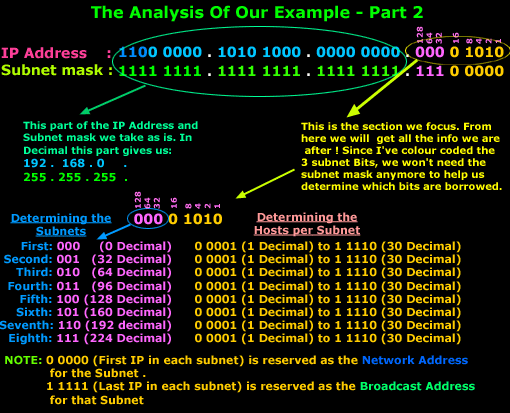
A subnet mask looks like an IP address—something like 255.255.255.0—but it serves a completely different purpose. In binary, a subnet mask is always a continuous string of 1s followed by a continuous string of 0s. The 1s mark the network bits. The 0s mark the host bits. Always. No exceptions. No mixing.
255.255.255.0 in binary is: 11111111.11111111.11111111.00000000
That’s 24 ones followed by 8 zeros. Which means the first 24 bits of the IP address are the network portion, and the last 8 bits are for hosts. This is why you’ll also see this written as /24—it’s just shorthand for “the first 24 bits are the network part.” That little slash notation is called CIDR notation, and once you get comfortable with it, it becomes your best friend.
The Cheat Sheet You Actually Need to Memorize
Okay, I know I said no “just memorize this” shortcuts. But there’s one thing you genuinely need to burn into your brain before anything else will make sense. It’s the powers of 2, and the subnet mask values that come from them.
Each bit position in an octet has a value:
128 | 64 | 32 | 16 | 8 | 4 | 2 | 1
These are the powers of 2 from left to right: 2⁷, 2⁶, 2⁵, 2⁴, 2³, 2², 2¹, 2⁰.
From these, the only possible subnet mask octet values are: 0, 128, 192, 224, 240, 248, 252, 254, and 255. Each one represents turning on one more bit from the left. Say it with me:
0 (no bits on), 128 (one bit), 192 (two bits), 224 (three bits), 240 (four bits), 248 (five bits), 252 (six bits), 254 (seven bits), 255 (all eight bits on).
If you remember nothing else from this section, remember those values and the bit position chart. Tattoo them on your forearm if you have to. I’m not joking—I had that chart on a sticky note on my monitor for three weeks straight.
Where Most People Get Lost (And Where I Got Lost Too)
Here’s what happened to me, and I bet it’s happening to you too. I understood the concept. Network portion, host portion, subnet mask, got it. But then someone would throw out a question like “What’s the subnet for 10.47.132.200/20?” and my brain would just… stall.
The problem wasn’t understanding. It was process. I didn’t have a reliable, repeatable set of steps that I could follow every single time. Some YouTube videos taught one method, my book taught another, and every Reddit post had a different “easy trick” that only worked for specific scenarios.
What I needed was one method. One process that works for every single subnetting question, whether it’s a /8 or a /29, whether it’s asking for the network address or the 437th usable host. And that’s what I’m going to give you now.
The Method: Four Steps That Changed Everything
I call this the “find the magic number” method, because that’s the core insight that makes everything fast. Here it is:
Step 1: Find the Interesting Octet
The “interesting octet” is the one where the subnet mask changes from 255 to something else. It’s where the network/host boundary falls. This is where all the action happens.
For /24 (255.255.255.0), the interesting octet is the 4th. For /16 (255.255.0.0), it’s the 3rd. For /20 (255.255.240.0), it’s the 3rd.
How do you figure this out quickly? Divide the CIDR number by 8.
If the prefix is /1 through /8, the interesting octet is the 1st. If it’s /9 through /16, it’s the 2nd. If it’s /17 through /24, it’s the 3rd. If it’s /25 through /32, it’s the 4th.
Or even simpler: which group of 8 does the prefix length fall in? /20 falls in the 17–24 range, so the interesting octet is the 3rd. Done.
Every octet before the interesting one has a mask value of 255 (fully network). Every octet after it has a mask value of 0 (fully host). You only need to do math in the interesting octet.
Step 2: Find the Mask Value in the Interesting Octet
Take the prefix length and figure out how many bits fall within the interesting octet. If the prefix is /20, and the interesting octet is the 3rd (covering bits 17–24), then 20 – 16 = 4 bits are “on” in that octet (we subtract 16 because 2 full octets came before it).
Now use the bit value chart: 4 bits on from the left = 128 + 64 + 32 + 16 = 240.
So the subnet mask for /20 is 255.255.240.0. The interesting octet value is 240.
Step 3: Find the Magic Number (Block Size)
This is the step that changed everything for me. The magic number is simply:
256 minus the subnet mask value in the interesting octet.
For our /20 example: 256 – 240 = 16.
That’s it. That number—16—tells you the size of each subnet in the interesting octet. Subnets start at multiples of 16: 0, 16, 32, 48, 64, 80, 96, 112, 128, 144, 160, 176, 192, 208, 224, 240. That’s the rhythm. That’s the heartbeat of the whole operation.
Why 256? Because an octet goes from 0 to 255, which is 256 possible values. The magic number tells you how big each “slice” of that 256 is. It’s the distance between one subnet and the next.
Step 4: Find Your Subnet (And Everything Else)
Now take the IP address and look at the interesting octet. Find the highest multiple of the magic number that is equal to or less than that value. That’s your network address (in the interesting octet).
Let’s work through 10.47.132.200/20.
The interesting octet is the 3rd (value: 132). The magic number is 16. Multiples of 16: 0, 16, 32, 48, 64, 80, 96, 112, 128, 144…
132 falls between 128 and 144. So the network address (interesting octet) is 128.
Now you can answer everything:
Network address: 10.47.128.0 — Take the magic number’s multiple, zero out everything after the interesting octet.
Next network: 10.47.144.0 — Just add the magic number (128 + 16 = 144).
Broadcast address: 10.47.143.255 — The next network minus one. 144.0 minus one is 143.255.
First usable host: 10.47.128.1 — Network address plus one.
Last usable host: 10.47.143.254 — Broadcast address minus one.
Number of usable hosts: 2^(32 – 20) – 2 = 2^12 – 2 = 4,094.
That problem that stumped me at 11:30 PM on a Thursday? Four steps. Under a minute once you’ve practiced.
Let’s Do Five More (Because Repetition Is How This Sticks)
Example 1: 192.168.10.77/26
Step 1 — Interesting octet: /26 falls in the 25–32 range → 4th octet. Mask bits in that octet: 26 – 24 = 2 bits.
Step 2 — Mask value: 128 + 64 = 192. Full mask: 255.255.255.192.
Step 3 — Magic number: 256 – 192 = 64.
Step 4 — Interesting octet value is 77. Multiples of 64: 0, 64, 128. 77 falls in the 64 block.
Network: 192.168.10.64. Broadcast: 192.168.10.127 (next subnet 128, minus 1). Usable hosts: 2⁶ – 2 = 62. First host: 192.168.10.65. Last host: 192.168.10.126.
Example 2: 172.16.55.12/18
Step 1 — Interesting octet: /18 is in the 17–24 range → 3rd octet. Bits in octet: 18 – 16 = 2 bits.
Step 2 — Mask value: 128 + 64 = 192. Full mask: 255.255.192.0.
Step 3 — Magic number: 256 – 192 = 64.
Step 4 — 3rd octet is 55. Multiples of 64: 0, 64. 55 is in the 0 block.
Network: 172.16.0.0. Broadcast: 172.16.63.255. Usable hosts: 2¹⁴ – 2 = 16,382. First host: 172.16.0.1. Last host: 172.16.63.254.
Example 3: 10.200.100.50/13
Step 1 — Interesting octet: /13 is in the 9–16 range → 2nd octet. Bits in octet: 13 – 8 = 5 bits.
Step 2 — Mask value: 128 + 64 + 32 + 16 + 8 = 248. Full mask: 255.248.0.0.
Step 3 — Magic number: 256 – 248 = 8.
Step 4 — 2nd octet is 200. Multiples of 8 near 200: 192, 200, 208. 200 is exactly on a boundary!
Network: 10.200.0.0. Broadcast: 10.207.255.255. Usable hosts: 2¹⁹ – 2 = 524,286.
See how 200 landed exactly on a subnet boundary? That happens sometimes. When it does, the IP address’s interesting octet is the network address. Don’t overthink it.
Example 4: 192.168.1.200/28
Step 1 — Interesting octet: /28 → 4th octet. Bits: 28 – 24 = 4.
Step 2 — Mask value: 128 + 64 + 32 + 16 = 240. Mask: 255.255.255.240.
Step 3 — Magic number: 256 – 240 = 16.
Step 4 — 4th octet is 200. Multiples of 16: …176, 192, 208. 200 is in the 192 block.
Network: 192.168.1.192. Broadcast: 192.168.1.207. Usable hosts: 2⁴ – 2 = 14.
Example 5: 10.0.0.1/8
Step 1 — Interesting octet: /8 → 1st octet. All 8 bits in the first octet are network bits.
Step 2 — Mask value: 255. Mask: 255.0.0.0.
Step 3 — Magic number: 256 – 255 = 1. Each subnet is exactly one value wide in the first octet.
Step 4 — 1st octet is 10. Network: 10.0.0.0. Broadcast: 10.255.255.255. Usable hosts: 2²⁴ – 2 = 16,777,214.
This is a classful default, and it’s the easiest one you’ll ever see. If this shows up on your exam, it’s a gift.
The Speed Run: Going from Steps to Mental Math
Here’s the secret nobody tells you about mental math subnetting: it’s not about being fast at math. It’s about doing the four steps so many times that you stop doing “steps” and start seeing patterns.
After about a hundred practice problems, something weird happened. I stopped calculating and started recognizing. I’d see /26 and my brain would instantly think “64.” I’d see /20 and think “16 in the third octet.” No math required. It was like learning to read—at first you sound out every letter, and then one day you just see the word.
Here’s how to accelerate that pattern recognition:
Memorize the magic numbers for every prefix length. There are only 8 possible magic numbers (because there are only 8 possible “interesting” values per octet): 128, 64, 32, 16, 8, 4, 2, and 1. Each prefix length maps to one of these. After enough practice, you’ll see /27 and instantly know the magic number is 32, the mask is 224, and subnets fall on multiples of 32. No calculation. Pure pattern.
Practice the “find the multiple” step until it’s instant. If the magic number is 64 and the octet value is 200, you need to find the nearest multiple of 64 below 200. That’s 192 (64 × 3). This is the step that takes the longest at first, but it’s also the one that speeds up the most with practice. Start by listing multiples, then you’ll start jumping straight to the answer.
Do ten problems a day. Not fifty. Not two. Ten. Every day. For two weeks. I used SubnettingPractice.com for random problems and timed myself. Week one, I averaged about 90 seconds per problem. By week two, I was under 20 seconds. By exam time, I could solve most problems in 5–10 seconds. Your brain is a pattern machine—you just need to feed it enough examples.
The Tricky Stuff Cisco Loves (And How to Handle It)
“How Many Subnets Can You Create?”
This question shows up constantly and it trips people up because the phrasing is weird. What they’re asking is: if you take a classful network and apply a longer prefix, how many subnets result?
The formula: 2^(subnet bits borrowed). “Borrowed” bits are the extra bits beyond the classful default.
Example: 192.168.1.0 is a Class C network (default /24). If you subnet it to /27, you’ve borrowed 3 bits (27 – 24 = 3). Number of subnets: 2³ = 8.
That’s it. Don’t let the phrasing confuse you.
“What Subnet Does This Host Belong To?”
This is literally just “find the network address,” which is Step 4 of our method. Cisco just phrases it differently to mess with you. Same math, different words.
“Which of These Hosts Are in the Same Subnet?”
Find the network address for each host. If they match, they’re in the same subnet. If they don’t, they aren’t. I’ve seen exam questions list four or five IP addresses with the same prefix length and ask you to group them. It sounds complex, but you’re just doing Step 4 multiple times.
“What’s the Most Efficient Subnet for 50 Hosts?”
Work backward from the host requirement. You need at least 50 usable hosts, which means you need 50 + 2 (network and broadcast) = 52 total addresses. The smallest power of 2 that fits is 64 (2⁶). So you need 6 host bits, which means the prefix length is 32 – 6 = /26.
The pattern here: figure out how many host bits you need (smallest power of 2 ≥ hosts + 2), subtract from 32.
Need 10 hosts? 10 + 2 = 12, next power of 2 is 16 (2⁴), prefix = 32 – 4 = /28.
Need 200 hosts? 202, next power of 2 is 256 (2⁸), prefix = 32 – 8 = /24.
Need 2000 hosts? 2002, next power of 2 is 2048 (2¹¹), prefix = 32 – 11 = /21.
Cisco loves this type of question because it combines subnetting knowledge with practical network design. If you’re using Boson ExamSim, you’ll see a lot of these—and their explanations walk through the logic beautifully every time.
The “Find the Nth Usable Host” Nightmare
Remember that problem I mentioned earlier—finding the 437th usable host in a /19 network? This sounds terrifying, but it’s just addition once you have the network address.
The 1st usable host is the network address + 1. The 437th usable host is the network address + 437. You just have to handle the octet math (carrying over when a value exceeds 255).
Example: Network address is 172.16.128.0/19. The 437th usable host = 172.16.128.0 + 437.
Start from the right: 0 + 437. That’s 1 full octet (256) plus 181. So the 4th octet becomes 181, and we carry 1 to the 3rd octet: 128 + 1 = 129.
Answer: 172.16.129.181. Once you see the carrying-over trick, these problems become straightforward arithmetic.
The Mistakes I Made So You Don’t Have To
Mistake 1: Trying to Do Everything in Binary
Every textbook starts with binary, and I get why—it’s technically how it all works. But trying to convert every IP address and subnet mask to binary for every problem is like trying to build a house by manufacturing your own bricks. Yes, bricks are fundamental to the house. No, you don’t need to make them yourself every time.
Learn binary well enough to understand why the method works. Then use the magic number method for speed. The binary understanding lives underneath, supporting everything, but you don’t need to surface it for every question.
Mistake 2: Memorizing a Subnet Chart Without Understanding It
I had a beautiful, color-coded subnet chart. Laminated it. Put it on my desk. And it was completely useless on exam day because I couldn’t bring it in with me, and I hadn’t actually learned what the numbers meant. When the pressure hit, my brain just saw a ghost image of colored boxes.
Build your own chart from scratch at the start of each practice session. After doing this twenty times, you won’t need the chart anymore because you’ll understand the pattern well enough to reconstruct any value on demand.
Mistake 3: Only Practicing “Find the Network Address”
Cisco doesn’t just ask one type of subnetting question. They ask for network addresses, broadcast addresses, host counts, subnet counts, “which host is valid,” “which addresses are in the same subnet,” and design questions about how many subnets you need for a given number of hosts. I practiced finding network addresses for weeks and then panicked the first time I saw a design question.
Practice every type. The four-step method handles all of them—you just need to know which variation of the final step to apply.
Mistake 4: Skipping /31 and /32
These are weird edge cases that absolutely show up on the exam. A /31 has two addresses and zero usable hosts by the old rules, but RFC 3021 allows both addresses to be used on point-to-point links. A /32 is a single host address, used for loopback interfaces and host routes. Know them. They’re easy points if you’re not caught off guard.
My Practice Routine (The One That Actually Worked)
After trying about six different approaches, here’s what finally turned me into a subnetting machine:
Week 1–2: Build the foundation. Ten problems per day using the four-step method, writing out every step longhand. Time yourself but don’t stress about speed. The goal is accuracy and process. Use SubnettingPractice.com for random problems.
Week 3–4: Speed and variety. Twenty problems per day, still writing steps but abbreviating. Start mixing in host-count questions, “same subnet” questions, and design questions. Target under 30 seconds per problem by end of week 4.
Week 5–6: Mental math and exam simulation. Do problems in your head. On the bus, in line for coffee, wherever. Quiz yourself with random CIDR notations and try to immediately state the magic number, mask value, and block size. When you can do this without thinking, you’re ready.
I also started using Boson ExamSim during this phase. What’s beautiful about Boson is that their subnetting questions aren’t isolated—they’re embedded in real scenario questions about routing, ACLs, and troubleshooting. So you’re not just subnetting in a vacuum; you’re subnetting as part of solving an actual network problem. That context is what makes the skill stick. And when you get one wrong, their explanations walk through the binary math step by step until there’s nowhere left to hide from understanding.
For more structured study plans that integrate subnetting practice into a complete CCNA prep schedule, the study plans on CCNATraining.com are worth checking out.
The Moment It Clicked (And It Will Click for You Too)
I remember the exact moment subnetting went from “learned skill” to “second nature.” I was at work, troubleshooting a connectivity issue between two VLANs. A colleague asked me what subnet a particular host was on. Without thinking—without pausing, without writing anything down—I said, “That’s in the 172.16.48.0/20 range, so the broadcast would be 172.16.63.255. Check if the gateway’s in that range.”
My colleague stared at me. “Did you just do that in your head?”
Yeah. I did. And I wasn’t even trying to show off. It was just… there. Like knowing 7 × 8 = 56. No calculation, just knowledge.
That’s where the four-step method takes you. Not to memorization. Not to “I can pass the test.” To genuine, practical, use-it-at-work understanding.
Quick Reference: The Numbers Worth Memorizing
Once you’ve worked through enough problems, these relationships become automatic. But here’s the reference if you want to accelerate the process:
CIDR /25: Mask 128, Magic Number 128, Hosts 126
CIDR /26: Mask 192, Magic Number 64, Hosts 62
CIDR /27: Mask 224, Magic Number 32, Hosts 30
CIDR /28: Mask 240, Magic Number 16, Hosts 14
CIDR /29: Mask 248, Magic Number 8, Hosts 6
CIDR /30: Mask 252, Magic Number 4, Hosts 2
These six are the ones that show up most on the CCNA. The /25–/30 range is where most real-world subnetting happens, and it’s where Cisco focuses its questions. You should be able to rattle off the magic number for any of these instantly.
For the classful boundaries (/8, /16, /24), the math is trivial—those are the easy ones. For the oddballs (/13, /19, /21), the four-step method handles them without any extra memorization.
What to Do Right Now
Close this article (after bookmarking it, obviously). Open SubnettingPractice.com or grab a random IP address generator. Do ten problems using the four-step method. Write out every step. Don’t time yourself yet. Just get the process into your hands and your head.
Tomorrow, do ten more. The next day, ten more. By the end of two weeks, you’ll notice you’re skipping steps because you already know the answer. That’s the pattern recognition kicking in. That’s the mental math developing.
And when you’re ready to test that subnetting knowledge under real exam pressure—with questions that weave subnetting into complex scenarios about routing, switching, and troubleshooting—Boson ExamSim will show you whether you really know this stuff or just think you do. Trust me, there’s a difference. And it’s better to find out in practice than in the testing center.
Subnetting is the mountain that every CCNA candidate has to climb. Most people stare at it and feel overwhelmed. But it’s not actually a mountain—it’s a staircase. Four steps, repeated until they become automatic. That’s all it is.
You’ve got this. And in six weeks, when someone asks you to subnet a /21 network and you answer before they finish the question, remember this article. And maybe buy yourself some Doritos to celebrate.
You’ve earned them.
Struggling with other CCNA topics? Check out the complete training guides on CCNATraining.com for the same plain-English approach to every exam objective. And if subnetting was your nemesis, just wait until you meet OSPF—but that’s a story for another article.